

Last updated: May 2026
This guide covers keyword research for blog posts, how-to articles, and informational content. It does NOT address e-commerce product pages, local SEO, or paid search keyword strategies, which follow different frameworks.
You wrote the article. You published it. Three months later, nothing. No rankings, no traffic, maybe a handful of accidental clicks from people who weren’t even looking for what you wrote.
Here’s the thing: the problem usually isn’t your writing. It’s that you chose the wrong keywords, or you chose the right ones without knowing whether you could realistically rank for them.
Keywords for content writing aren’t just words you sprinkle into headings. They’re the bridge between what you write and what real people are actually searching for, and getting that bridge right is the difference between content that ranks and content that disappears.
This guide walks you through the full research process from picking seed topics to mapping keywords to the right content format without assuming you have a paid tool subscription or years of SEO experience.
Keywords for content writing are the specific words and phrases your target readers type into search engines when looking for information. Choosing the right ones based on search volume, difficulty, and intent determines whether your article gets found or stays invisible.
Why Most Writers Pick Keywords That Don’t Work
Most people approach keyword research backwards. They write the article first, then wonder what keyword to target, which is roughly like building a house and then checking if there’s a foundation.
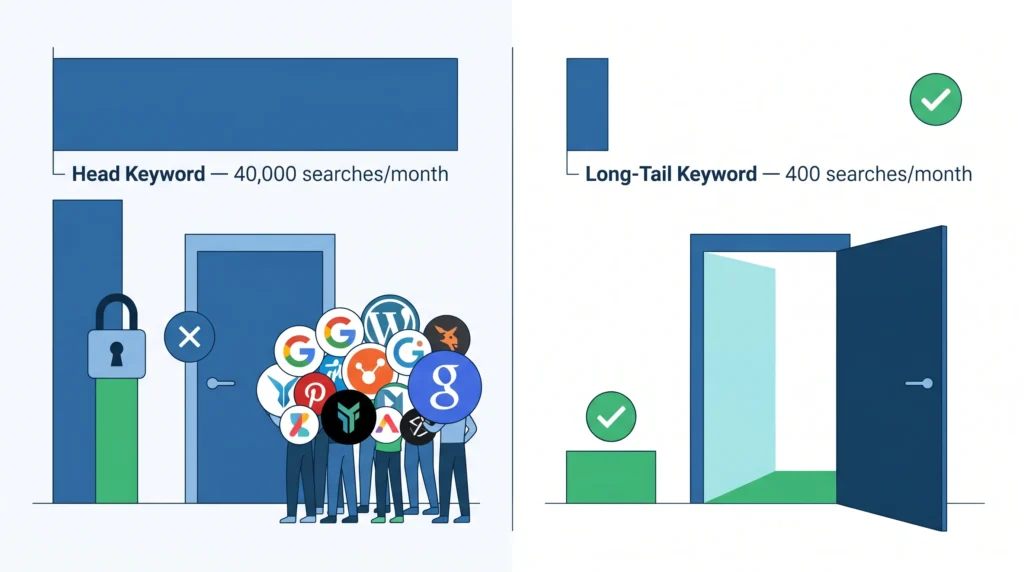
The other common mistake: treating high search volume as a signal of opportunity. A keyword with 40,000 monthly searches isn’t an opportunity for a new site. It’s a locked door. The sites ranking there have hundreds of backlinks, years of authority, and full SEO teams. You can’t outrank them in six months on a new blog, no matter how strong your content is.
What most guides skip is this: keyword difficulty isn’t just the number on a tool’s dashboard. It’s about understanding why those pages rank domain authority, topical depth, or a better intent match. Only the last reason is beatable by a new site.
Quick note: I’ve seen conflicting data across tools on what ‘low difficulty’ actually means. Ahrefs and Semrush calibrate their difficulty scores differently, and a KD of 20 in Ahrefs is not the same as a KD of 20 in Semrush. My read is: use one tool consistently and compare keywords within that tool’s ecosystem only.
Start With What Your Reader Is Actually Asking
Before you open any tool, do this: write down the exact question your reader has. Not a topic. A question.
Bad: content marketing. Good: How do I find keywords for a blog post without paying for Ahrefs?
That shift changes everything. Now you’re thinking like a searcher, not a writer.
From that question, pull your seed keyword, the 2–4 word phrase at the core of the question. In this case: keywords for blog posts. That seed is what you’ll feed into research tools next.
Where to Find Seed Keywords Without Any Tool
Start with Google itself. Type your broad topic into the search bar and look at three places:
- Autocomplete suggestions that appear as you type
- The “People also ask” box inside the results page
- The “Related searches” section at the bottom of the page
Each surface real language real people are using. Google wouldn’t suggest these phrases if nobody were searching them.
Google Search Console, if your site already has some traffic, is the best free source for this. It shows exact phrases people used to land on your pages, including many too niche or new to appear in any paid tool.
Finding keywords for content writing starts with understanding what question your reader is trying to answer, then identifying the 2–4-word phrase at the core of that question. According to Google’s own search data, 15% of all daily searches are completely new phrases never searched before, which means seed keyword brainstorming should start with real reader language, not assumptions about what “sounds like a keyword.”
Evaluate Keywords Before You Commit
Here’s where most beginner guides end, right when things get useful.
Finding a keyword takes five minutes. Knowing whether you should target it requires three specific metrics and one that most tools don’t even surface.
The Three Metrics That Actually Matter
Search volume tells you how many times per month a keyword is searched. For a new or low-authority site, target 100–1,000 monthly searches. That range is specific enough to be winnable and broad enough to send meaningful traffic if you rank.
Keyword difficulty (KD) is a 0–100 score estimating how hard it is to reach the top 10 results. On Ahrefs Keyword Explorer, aim for a KD under 20 if your site is new. Semrush Keyword Magic Tool shows a similar metric, but it compares only within the same tool.
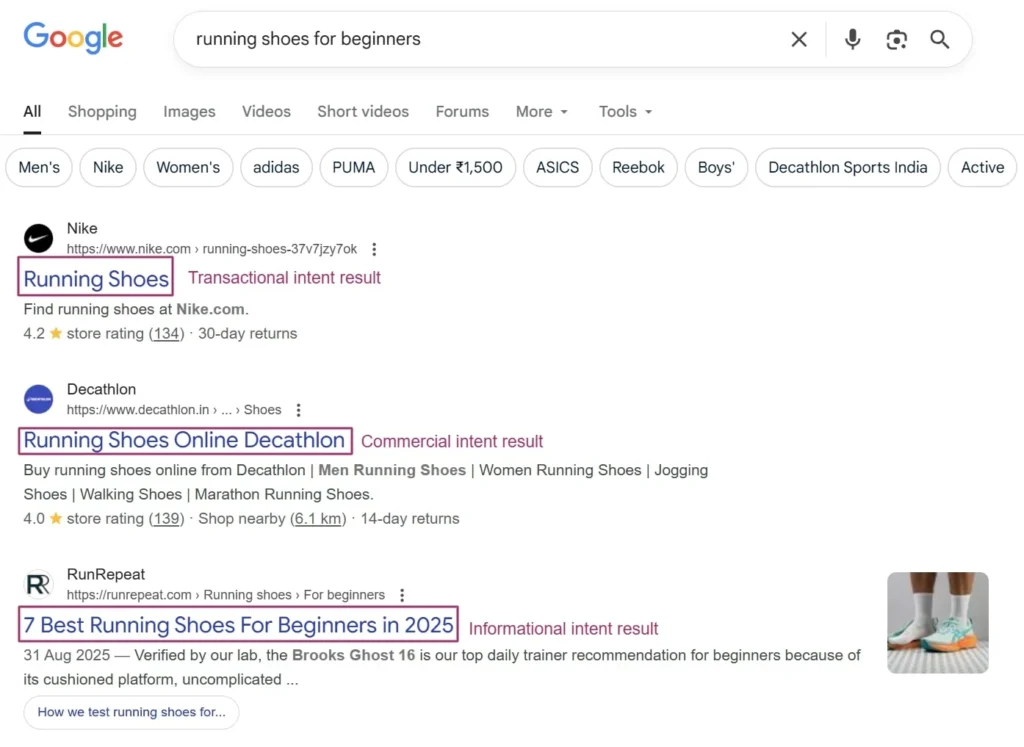
Search intent is the most important and most overlooked metric, and it won’t appear on any dashboard. It means understanding what the searcher is actually trying to do: learn, compare, or buy. If your article’s intent doesn’t match the searcher’s intent, you won’t rank, full stop, even with perfect keyword placement.
To evaluate a keyword for a new content site:
- Check monthly search volume target 100–1,000 for new sites.
- Check keyword difficulty, aim for KD under 20 on Ahrefs.
- Open the top 3 ranking results blog posts or product pages?
- Read the content. Does your article match that intent?
- Only proceed if all four checks pass.
A Counter-Intuitive Truth About Search Volume
Most people assume higher search volume equals more opportunity. The data says otherwise. Choosing keywords purely by volume is exactly the trap that a custom SEO strategy is designed to escape, starting instead from revenue targets and working backward to the queries that actually close deals.
According to Ranktracker (2025), long-tail keywords with 3+ words account for 70% of all search traffic and convert at nearly 2.5x the rate of short-tail keywords. A keyword like how to find keywords for blog posts free may show only 400 monthly searches, but it converts better, faces weaker competition, and is far more achievable for a site without established domain authority.
Or maybe I should say it this way: a 5% click-through rate on a 400-search keyword gets you 20 targeted visitors per month who actually want what you wrote. A 0.3% CTR on a 40,000-search keyword, which is what you’d realistically get ranking at position 15, gives you 120 visitors who bounce immediately. Which is worth more?
If you’ve already published keyword-targeted content and it’s not ranking, the issue may go deeper than keywords; technical SEO factors that affect how your content gets crawled and indexed are a common hidden culprit.
Quick Comparison: Keyword Research Tools for Content Writers
| Tool | Best For | Key Benefit | Limitation |
| Google Search Console | Sites with existing traffic | Free shows real click data from your own pages | No data for pages with zero traffic yet |
| Ahrefs Keyword Explorer | Competitive research + KD scoring | Most accurate backlink and difficulty data | Paid (~$129/mo); steep for beginners |
| Semrush Keyword Magic Tool | Large-scale keyword discovery | Massive database; strong intent filters | Paid can skew high on volume estimates |
| Google Keyword Planner | Free volume ballparks | Free with a Google Ads account | Shows ranges, not exact volumes; built for ads |
| AnswerThePublic | Question-based keyword discovery | Surfaces ‘how’, ‘why’, ‘what’ variations instantly | Free version limits daily searches; no KD data |
Map Keywords to Content Types (The Step Nobody Covers)
This is the gap in nearly every keyword guide you’ll find. Tools tell you which keywords to target. They don’t tell you what kind of content to create for each one.
One underused method is using paid search data to validate content keywords before committing to long-form content, a core principle of search engine marketing intelligence that confirms which terms drive real conversions, not just clicks.
That distinction matters because Google already knows what content format searchers expect for a given keyword, and it rewards pages that match. Mismatch the format, and you lose, regardless of keyword placement.
Blog post vs. landing page for keywords: Blog posts suit informational intent (“how to find keywords”) because searchers want to learn. Landing pages suit transactional intent (“keyword research tool free trial”) because searchers are ready to act. The key difference is whether the searcher wants an answer or a solution they can download or buy right now.
How to Match Keyword Intent to Content Format
Open the top 3 results for your keyword. Don’t read them yet, just look at the format:
- Are these blog posts or product/service pages?
- Are they long guides or short FAQ-style answers?
- Do they use numbered steps or comparison tables?
- Are they beginner-friendly or written for practitioners?
Whatever format dominates the top 3 results is the format Google has decided best satisfies that keyword’s intent. Match it.
Some experts argue you can outrank existing formats with something radically different, a tool-based post where everyone else publishes lists. That’s valid for established sites with strong domain authority. But if you’re dealing with a new site, the safer move is to match the dominant format and out-execute on depth, clarity, and practical specificity.
Place Keywords Without Killing the Reading Experience
Keyword placement isn’t a mystery. There’s a short list of high-priority locations and a simple rule for everything else: write naturally.
The Six High-Priority Placement Locations
- Page title (H1) primary keyword in the first 5 words, if possible
- Meta title tag same keyword, under 58 characters total
- First 100 words of the article body are present but not forced
- One H2 heading doesn’t repeat in every heading
- Image alt text descriptive, keyword-natural, under 125 characters
- Meta description keyword near the start, specific benefit, soft CTA
That’s the full list. Everything beyond that is natural usage. Write for your reader, include related terminology, and the keyword will appear organically as many times as it needs to.
Look, if you’re in the situation where you’re counting keyword appearances, trying to hit a specific “keyword density” percentage: stop. That approach is from 2012. Google now evaluates topical relevance, not keyword frequency. Covering the topic thoroughly, using related terms naturally, and matching search intent will outperform any density formula.
If you’d rather skip the research and let a team handle it end-to-end, Nexklicks’ SEO and content writing services are built around this exact brief-to-publish workflow.
Secondary Keywords: Use Them, Don’t Stuff Them
Secondary keywords like “how to find keywords for blog posts” or “SEO keywords for content strategy” serve two purposes: helping Google understand your topic’s full scope, and capturing additional traffic from related searches.
Include them in H3 headings, body paragraphs, and FAQ answers. One or two natural appearances per secondary keyword is sufficient.
For Google’s official stance on this, the Google Search Central content guidelines are worth bookmarking, especially the section on writing for people, not search engines.
Using keywords in content writing effectively means placing the primary keyword in the H1, the first 100 words, one H2, and the meta title, then writing naturally from there. According to Semrush’s 2024 content study, pages that matched search intent outranked pages with higher keyword density in 73% of analyzed SERP positions, confirming that topic coverage matters more than keyword repetition.
The One Mistake That Wastes All Your Research
You did the research. You found a solid keyword with decent volume, low difficulty, and clear intent match. Then you wrote one article targeting one keyword.
That’s the mistake.
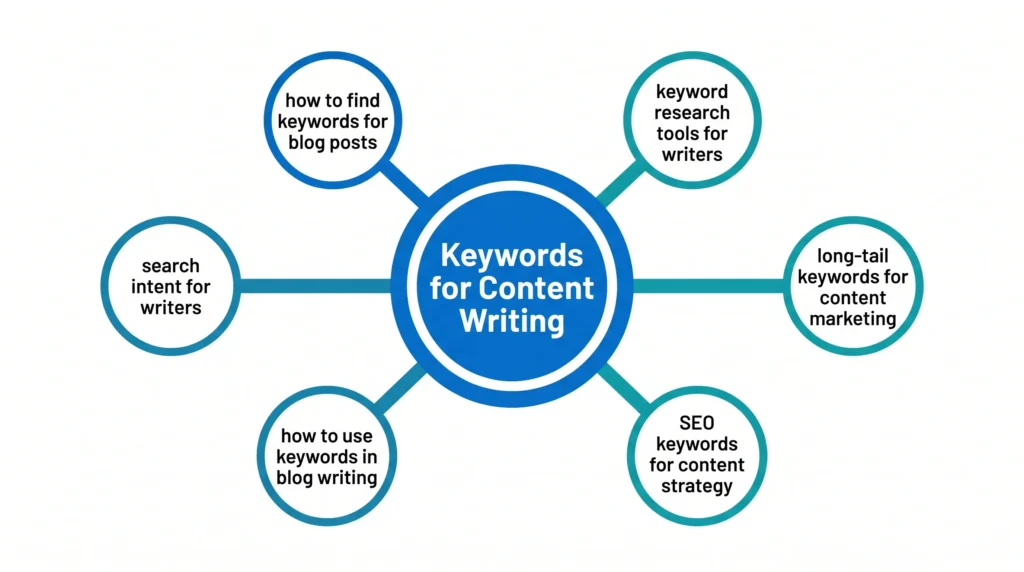
A single article can and should target a cluster of related keywords. Keyword clustering means grouping semantically related terms under one piece of content so your article satisfies multiple search variations at once. Content writers who cluster keywords correctly get 30–40% more organic visibility from the same article versus targeting single keywords.
A simple example: if your primary keyword is “keywords for content writing,” your article naturally covers how to find keywords for blog posts, how to use keywords in SEO writing, what search intent means, and which tools a beginner should use. Those aren’t separate articles. They’re sections of one thorough guide.
Keyword clustering for content writing means grouping related search terms under one article rather than creating separate pages for each variation. According to Ahrefs data (2025), pages optimized for keyword clusters rather than single keywords earn twice as many referring domains over 12 months, because they satisfy broader topical intent and attract links from multiple query contexts.
Frequently Asked Questions
Q: What is the best free tool for keyword research for content writing?
A: Google Search Console is the best free tool if your site already has traffic — it shows real search terms people used to find your pages. For sites with no traffic yet, Google Keyword Planner (free with a Google Ads account) and AnswerThePublic give reasonable starting data without a subscription.
Q: How do I know if a keyword is too competitive for a new site?
A: Check the keyword difficulty score in Ahrefs or Semrush, then open the top 3 ranking pages. If those results come from sites with 50,000+ pages and thousands of backlinks, the keyword is out of reach. Target KD under 20 in Ahrefs for new sites, and look for results dominated by smaller blogs rather than major publications.
Q: Should I use the same keyword in every heading?
A: No. Use the primary keyword in your H1 and one H2 naturally. For remaining headings, use related terms and question-based phrases. Repeating the exact keyword in every heading is a spam signal — and it makes the article harder to scan.
Q: Why does my article with good keywords still not rank?
A: The most common reason is search intent mismatch. If Google shows product comparison pages for your keyword but you wrote a beginner how-to, your content doesn’t match what searchers at that stage want. Check the format of the top 3 results and either rewrite to match or choose a different keyword.
Q: When should I start keyword research — before or after writing?
A: Always before. Keyword research determines the topic, the angle, the content format, the target audience, and the heading structure. Writing first and adding keywords after is content creation without a strategy — you’re guessing at what people want to read.
Final Thought
Keyword research isn’t a one-time task you do before writing. It’s the lens through which every content decision gets made, what to write, how long, which format, and which questions to answer.
Start with the reader’s question. Find keywords that match both your content’s scope and your site’s current authority. Map each keyword to the right content type. Cluster related terms so one article does the work of many.
The one mistake to avoid: choosing a keyword because it has impressive search volume, without checking whether your site can realistically compete for it. Volume without winnability is just ambition without a plan.
Once you have the right keywords, you need a content writing process that turns those keywords into ranked articles.
Now you have the framework. Pick your first seed keyword and run it through the process above, not next week. Today. If you want to see real results from content-led SEO campaigns before committing to a process, the Nexklicks case studies are worth reading before you start.

Leave a Reply