
Last updated: June 2026
This guide covers naming image files before and after upload, the relationship between filenames, alt text, page copy, and image sitemaps. It does not cover image compression, WebP conversion, or Core Web Vitals; those are separate topics.
Most site owners spend hours on title tags and meta descriptions. Then they upload 30 images named IMG_4821.jpg and wonder why Google Images sends them zero traffic.
That’s the gap this guide closes. SEO image names are one of the fastest, most underused optimizations on any website, and the rules are simpler than most people make them.
Here’s what you actually need to know.
What Are SEO Image Names And Do They Actually Matter?
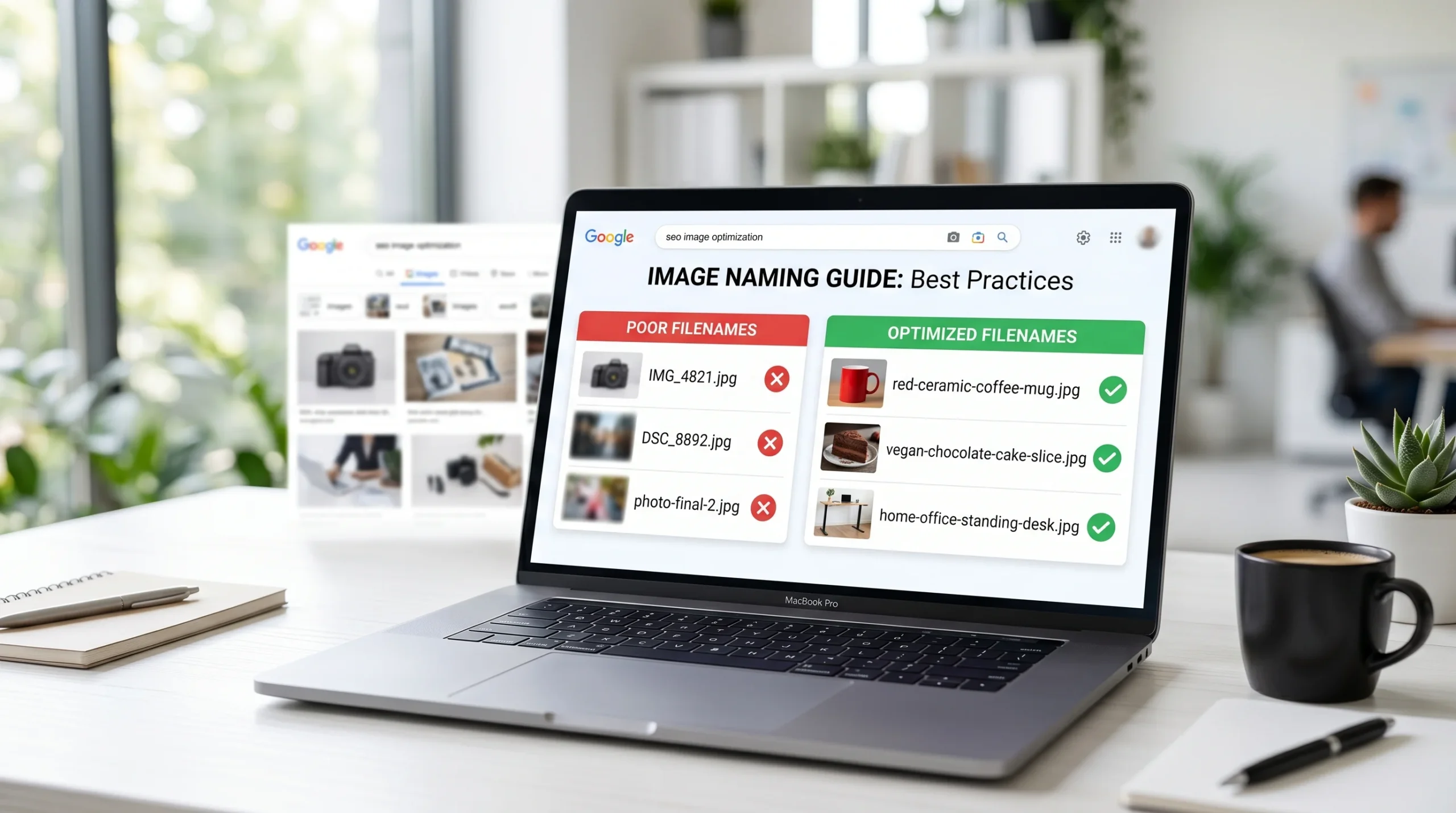
SEO image names are descriptive, keyword-relevant filenames assigned to image files before (or after) uploading them to a website. Rather than leaving a camera-generated label like DSC_0047.jpg, an optimized filename tells search engines what the image shows, for example, red-ceramic-coffee-mug.jpg.
According to Google Search Central’s official image guidance, search engines use the filename as one of several text-based signals to understand image content. Google can’t “see” an image the way a human does. It reads labels, and a filename is one of the earliest labels it encounters.
Does it move the needle? Here’s where I’ve seen conflicting data. Some SEO professionals argue that filenames are a minor signal compared to alt text or surrounding page copy. Others point to real ranking lifts after bulk-renaming images on established pages. My read: filenames are a supporting signal, not a primary one, but when combined with matching alt text and contextual copy, the cumulative effect is measurable. Especially for Google Images, where over 1 billion searches happen every day (TrueList, 2024).
That’s a traffic channel most content creators leave completely unaddressed.
The 5 Rules for Naming Images for SEO
This is the practical core. Apply these before you upload anything.
Rule 1: Describe What’s Actually in the Image
The filename should answer one question: what does this image show?
Not what page it’s on. Not what keyword you’re targeting. What is literally depicted?
- blue-suede-chelsea-boots.jpg ✅
- best-shoes-buy-online-2026-footwear.jpg ❌
Users who’ve tried to stuff their target keyword into every filename often end up with 40 images on a page all named seo-agency-london.jpg. Google sees that as spam. The Screaming Frog SEO Spider will actually flag this pattern when you crawl your site; it shows up as duplicate image filenames, which is a quick red flag.
Rule 2: Use Hyphens, Not Underscores
Separate every word with a hyphen. Google treats hyphens as word separators. Underscores do not behave the same way in image URLs — red_mug.jpg may be read as a single token redmug, making the individual words harder to parse.
red-ceramic-mug.jpg — correct. red_ceramic_mug.jpg — technically works, but avoid it. redceramicmug.jpg — Google may struggle to parse this entirely.
Rule 3: Keep It Under 5 Words
That’s the ceiling. Short filenames are more readable in URLs, easier to audit in bulk, and harder to accidentally keyword-stuff.
If your filename hits 6–7 words, that’s a signal you’re padding. Cut the least descriptive word.
Rule 4: No Keyword Stuffing
This is the most common mistake. And it genuinely used to work roughly 8–10 years ago; naming every image wedding-photographer-scottsdale.jpg on a wedding photography site would help rankings. Google’s gotten considerably smarter since then.
To [create clean SEO image names], follow these steps:
- Look at the image and describe what you literally see in 3–5 words
- Replace spaces with hyphens
- Remove any word that isn’t describing the image content
- Save as lowercase, no special characters
That’s it. No keyword research needed for individual images.
Rule 5: Match the Image to Its Page Context
Here’s what most guides skip entirely.
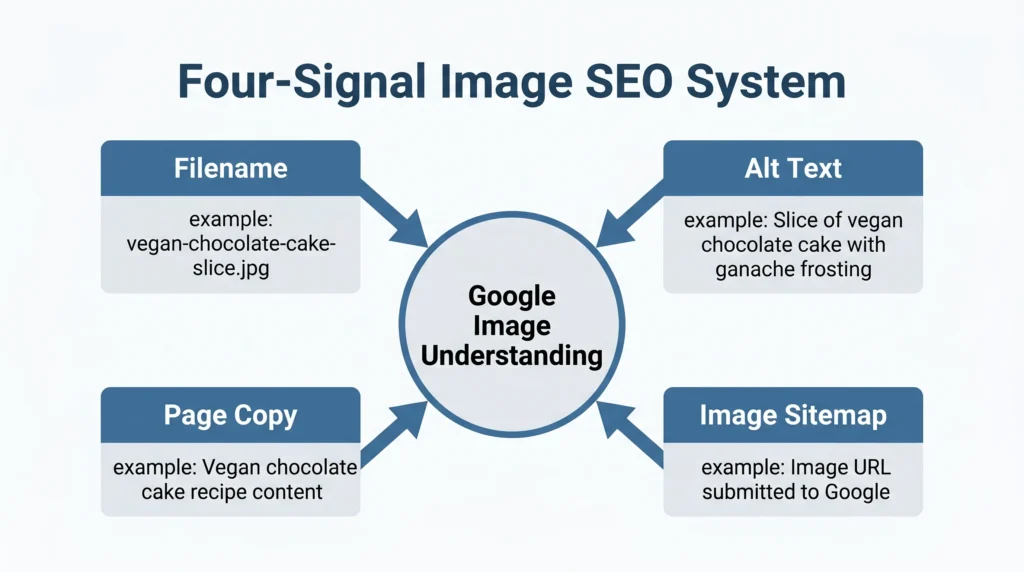
An image filename doesn’t work in isolation. Google reads it alongside three other signals: alt text, surrounding page copy, and whether the image appears in an image sitemap. When all four align around the same topic, that’s when image rankings become reliable.
Example: a recipe page for vegan chocolate cake:
- Filename: vegan-chocolate-cake-slice.jpg
- Alt text: Slice of vegan chocolate cake with ganache frosting
- Surrounding copy mentions “vegan chocolate cake” multiple times
- Image sitemap entry exists for the URL
All four signals reinforce the same topic. Google has no ambiguity. That’s the setup that drives Google Image Pack appearances.
Hyphens vs. Underscores vs. Spaces: The Quick Answer
A question that surfaces constantly, and the confusion is understandable because older tutorials contradict each other.
Quick Comparison Image Filename Separators
| Option | Best For | Key Benefit | Limitation |
| Hyphens (-) | All image filenames | Google reads as word separators | None, this is the standard |
| Underscores (_) | System/internal files | Familiar with code conventions | Google historically treats as joined words in URLs |
| Spaces (encoded as %20) | Nothing | — | Breaks URLs, creates messy file paths |
| CamelCase (RedMug.jpg) | Nothing | — | Google may not parse word breaks reliably |
Use hyphens. Every time. No exceptions.
What to Do With Images Already Uploaded
This is the gap that both the Google documentation and most SEO blogs completely ignore. They tell you how to name images before uploading. Nobody explains what to do with the 847 images already sitting on your live site.
This is one of the more common SEO mistakes that quietly hurt your rankings, invisible until you run an audit.
Here’s the honest answer: renaming already-indexed images has a cost.
When you rename an image file, its URL changes. Any existing Google Image index entry for that URL breaks. If other pages link to the image directly, those links break too. The SEO benefit of a better filename rarely outweighs the disruption unless the image URL was genuinely unintelligible (like DSC_0047.jpg) and Google has never successfully indexed it.
The practical workflow:
- High-priority pages (top 10% of organic traffic): rename images, set up 301 redirects from old image URLs to new ones, update image sitemaps
- Mid-tier pages: rename on next content refresh, don’t rush it
- Old posts with low traffic: not worth the effort, leave them
Use Screaming Frog to audit your current image filenames. Filter for files containing IMG_, DSC_, photo, or pure numbers. Those are your worst offenders. Prioritize by page traffic, not by page count.
Or maybe I should say it this way: fix the highest-traffic pages first, and the ROI becomes obvious within a few Search Console reporting cycles.
Image Filename vs. Alt Text: Which Signal Is Stronger?
A fair question, and most articles either avoid it or give a wishy-washy non-answer.
Alt text is the stronger signal. Google’s own documentation places alt text above filenames in its list of image understanding signals. Alt text also serves an accessibility function (screen readers), which gives it additional weight in quality assessments.
But here’s the actual opportunity: most sites optimize alt text and ignore filenames entirely. That means a filename that reinforces the alt text creates a signal stack your competitors haven’t bothered to build.
alt=”vegan chocolate cake with ganache” + filename: vegan-chocolate-cake-slice.jpg = consistent, reinforcing signals.
alt=”vegan chocolate cake with ganache” + filename: IMG_4821.jpg = one strong signal undermined by one meaningless one.
Image filename vs. alt text in plain terms:
- Alt text is better for ranking in traditional Google Search results
- Filenames contribute more heavily to Google Images indexing
- Both together outperform either alone, especially for Google’s Image Pack in regular SERPs
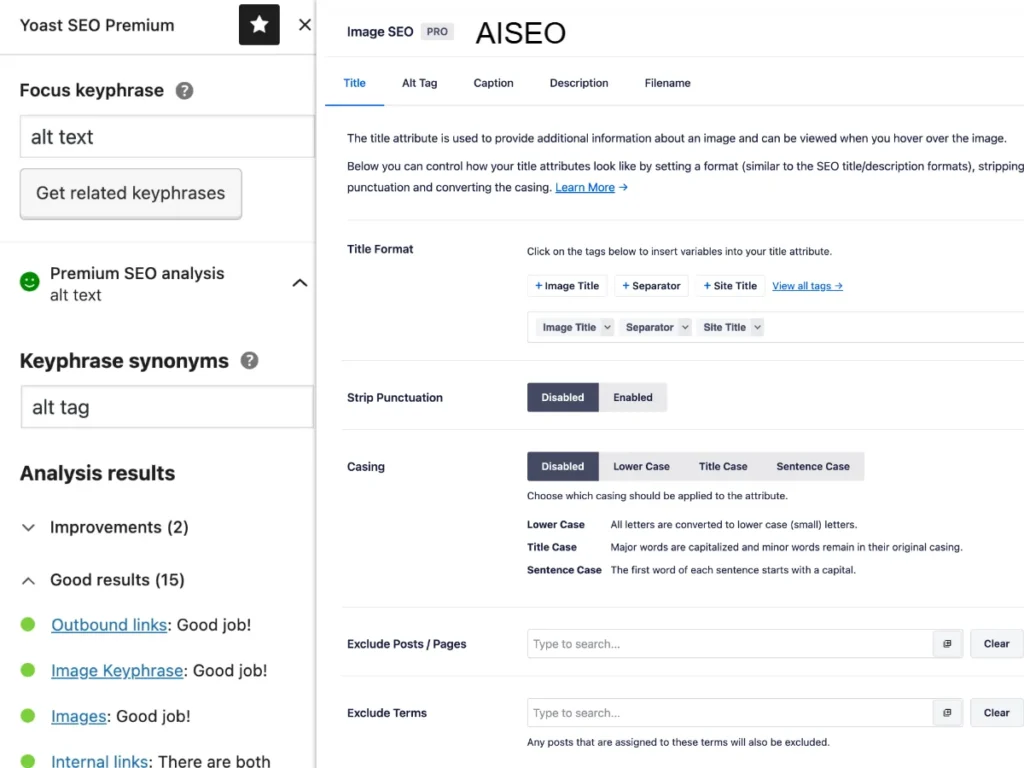
AIOSEO, for example, surfaces both fields side-by-side in its image editing panel, which makes it easy to keep them aligned. Yoast SEO flags missing alt text but doesn’t surface filename recommendations, a real gap if you’re relying on it as your only image SEO tool.
The Role of Image Sitemaps (Most Guides Don’t Cover This)
Look, if you’re running an image-heavy site (ecommerce, photography, recipe blog, real estate), here’s what actually works at scale.
An image sitemap tells Google about images it might not find through normal crawling — especially images loaded via JavaScript or embedded in CSS backgrounds. Google Search Central explicitly recommends them for image-heavy sites.
A basic image sitemap entry looks like this:
xml
<url>
<loc>https://example.com/recipes/vegan-chocolate-cake/</loc>
<image:image>
<image:loc>https://example.com/images/vegan-chocolate-cake-slice.jpg</image:loc>
<image:title>Vegan Chocolate Cake with Ganache Frosting</image:title>
<image:caption>A slice of vegan chocolate cake topped with dark ganache</image:caption>
</image:image>
</url>
The image:title and image:caption fields are additional text signals Google reads, and they should reinforce your filename and alt text, not contradict them.
Images don’t operate in isolation; they’re one piece of a wider content structure. If you want the full picture on how to structure your content so it ranks and gets read, that guide covers the process from research to publish.
Quick note: AIOSEO generates image sitemaps automatically. If you’re on WordPress without it, the Yoast SEO plugin does include basic sitemap support, though it doesn’t give you granular control over image titles and captions within the sitemap itself.
Real Examples: Good and Bad SEO Image Names
Nothing makes this clearer than actual before/after pairs. Here’s a range across different site types.
Ecommerce product images:
- ❌ product-123-front.jpg
- ✅ navy-linen-blazer-front.jpg
For Shopify and WooCommerce stores, image filenames sit within a broader set of on-page SEO signals that affect product page rankings, and the filename is the one most ecommerce guides skip entirely.
Blog post hero images:
- ❌ shutterstock_493021847.jpg
- ✅ home-office-standing-desk-setup.jpg
Recipe images:
- ❌ final_photo2.jpg
- ✅ crispy-tofu-stir-fry-bowl.jpg
Local business (e.g., dentist clinic):
- ❌ IMG_dental_room.jpg
- ✅ dental-exam-room-portland.jpg (location is fair to include here — it’s describing where the image was taken)
What about including location in the filename?
This is nuanced. Including a city or location in a filename is legitimate if the location is visible in or directly relevant to the image. A photo of your storefront in Portland? bakery-storefront-portland.jpg is accurate. A generic product photo with a city name jammed in? That’s keyword stuffing regardless of how natural it sounds.
Voice Search Q&A
Q: What’s the best way to name images for SEO?
A: Use 3–5 lowercase words describing what the image shows, separated by hyphens. Match the filename to your alt text for maximum signal strength. Avoid generic camera names like IMG_4821.jpg.
Q: How do I name images that are already uploaded and indexed?
A: For high-traffic pages, rename the file, set a 301 redirect from the old image URL, and update your sitemap. For low-traffic pages, leave them — the disruption outweighs the benefit.
Q: Should I use hyphens or underscores in image names?
A: Always hyphens. Google treats hyphens as word separators in URLs. Underscores may cause words to be read as a single string, reducing the signal value of each individual word.
Q: Why does Google not rank my images even though I have alt text?
A: Alt text alone isn’t always enough. Check that your filename, alt text, surrounding paragraph copy, and image sitemap all reinforce the same topic. Misalignment between these four signals is the most common cause of poor image rankings.
Q: When should I include a location in an image filename?
A: Only when the location is genuinely relevant to what the image depicts — a storefront, a venue, a landmark. Using a city name on generic product photos is considered keyword stuffing by current Google standards.
The One Mistake That Kills Image SEO Quietly
Naming images correctly on page creation, then never auditing what’s actually there.
Sites accumulate hundreds of unoptimized images over months and years. A quarterly Screaming Frog crawl filtered by image filename is the simplest way to catch drift. Export the list, sort by URL pattern, and prioritize by page-level traffic in Search Console.
The goal isn’t perfection across every image. The goal is clean signals on the pages that matter.
Wrapping Up
SEO image names are one of the few technical SEO tasks that don’t require developer access, plugin upgrades, or a rebuild. You rename a file. You upload it. Done.
The mistake to avoid: treating the filename as a second alt text field and stuffing it with keywords. Describe the image. Keep it short. Match it to your alt text. Let the page copy and sitemap do the rest.
Start with your five highest-traffic pages. Pull the images, check the filenames, and fix the ones named with camera codes or keyword bombs. That’s the entire first step.


Leave a Reply