
Last updated: May 2026
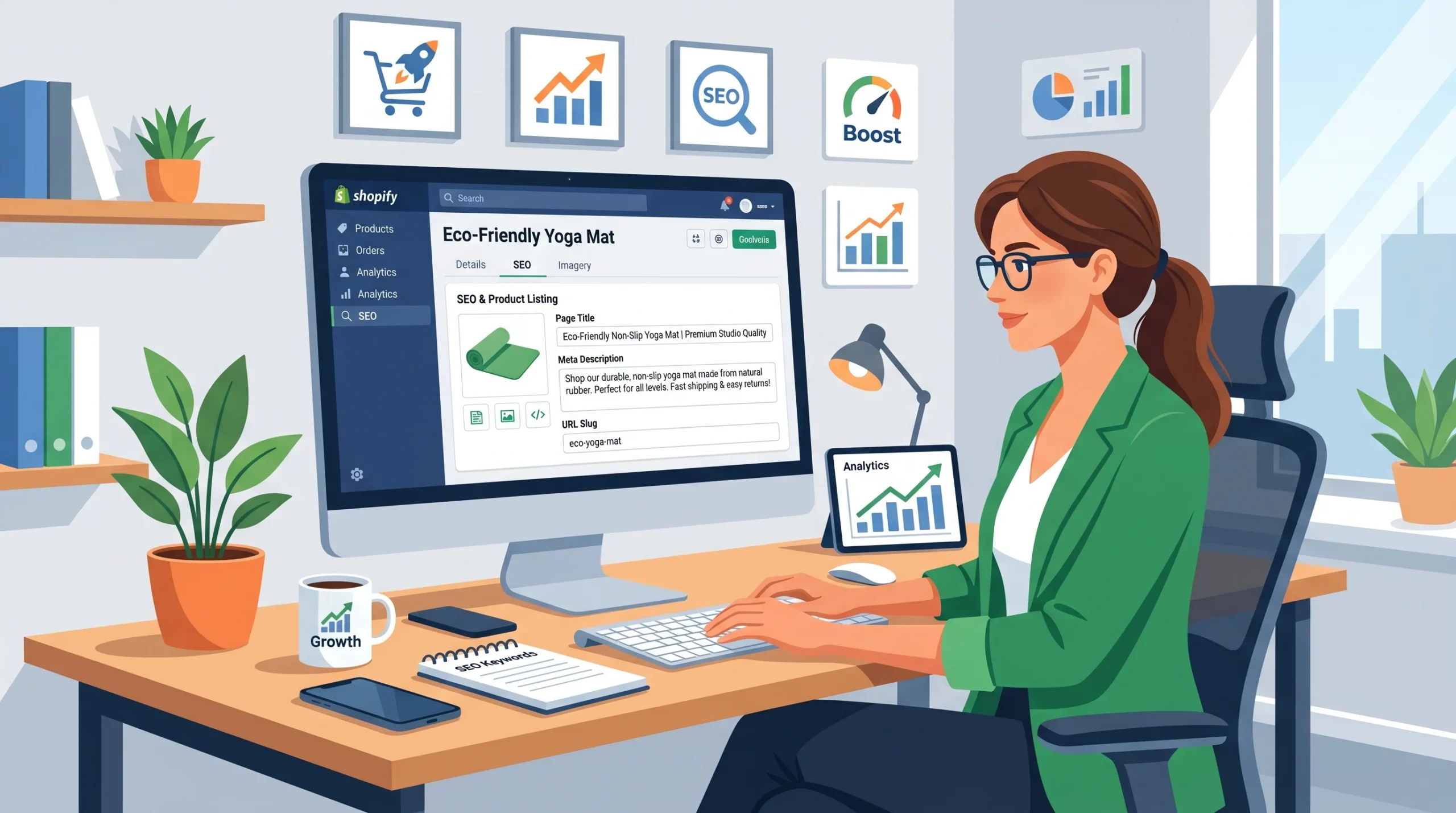
This guide covers on-page optimization for ecommerce product and category pages on Shopify and WooCommerce. It does NOT address technical SEO infrastructure, off-page link building, or paid search strategy.
Your product pages are live. Your meta fields are filled in. You ran an audit.
And yet nothing ranks.
Here’s what most SEO guides won’t tell you: generic on-page advice was written for blogs, not stores. Ecommerce on-page SEO operates by different rules because your pages need to rank and convert, which creates a tension that most tutorials completely ignore.
This guide fixes that. You’ll get a page-by-page framework for product pages, category pages, and supporting content, including the AI Overview shift that’s quietly crushing organic CTR for stores that haven’t adapted.
What Ecommerce On-Page SEO Actually Means (And Why It’s Different)
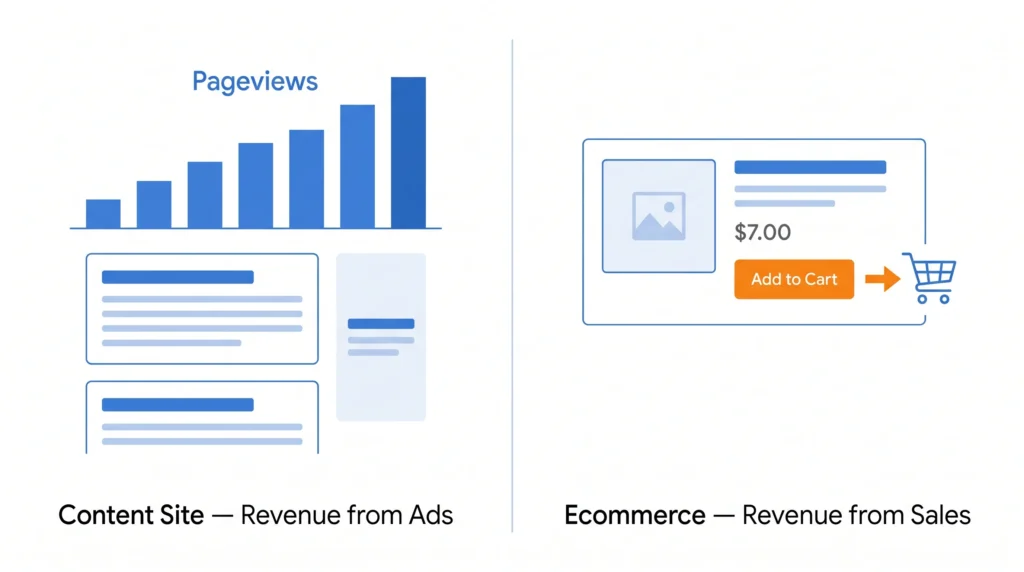
Ecommerce on-page SEO is the practice of optimizing individual pages on an online store, primarily product and category pages, so they rank for purchase-intent keywords and convert the visitors they attract. Unlike blog SEO, where traffic alone generates value, an unoptimized ecommerce page that ranks but doesn’t convert is still a failure.
That distinction matters more than most people realize.
A content site can publish 2,000 words about “best running shoes” and monetize every visitor through display ads. Your product page needs that same visitor to click Add to Cart. Which means your on-page work has two jobs: satisfy Google’s ranking criteria and satisfy the buyer’s decision-making criteria at the same time.
According to BigCommerce’s internal data cited in SearchAtlas’s 2025 SEO statistics report, retailers that optimize meta titles and product descriptions see a 32% increase in organic sales. Not traffic. Sales.
That’s the correct metric to optimize for.
According to SeoProfy (2025), 23.6% of all ecommerce orders come directly from organic traffic, nearly one in four purchases. On-page SEO is not a “nice to have” channel. For most stores, it’s the highest-ROI growth lever available once the foundational work is done.
Why Your Pages Aren’t Ranking (The Real Diagnosis)
Most store owners who’ve “done SEO” have actually done meta-field SEO, they’ve filled in title tags and descriptions using Yoast or Rank Math, maybe added keywords to their H1, and called it done.
That’s not on-page SEO. That’s on-page formatting.
The gap is strategy. Specifically: which keyword goes on which page, how the page content earns topical relevance, and whether the page actually answers what the searcher wants to find.
Here’s the thing: Google isn’t just reading your meta title. It’s evaluating the full semantic context of the page product descriptions, review content, FAQ sections, internal link context, schema markup, and deciding whether your page is the most useful result for a specific query.
Users who’ve spent time in Shopify stores often make the same three mistakes before figuring this out:
- Targeting the same keyword on multiple pages, a product page and a category page, both optimized for “women’s running shoes,” cannibalize each other
- Writing manufacturer descriptions duplicates content across dozens of product pages that Google deprioritizes because it appears on supplier sites first
- Ignoring page-type intent, a product page cannot rank for informational queries like “how to choose running shoes,” no matter how well it’s optimized
Or maybe I should say it this way: the problem isn’t that you haven’t done SEO. It’s that you’ve been applying the right tactics to the wrong pages.
How to Build Your Ecommerce Keyword Strategy by Page Type
Before you touch a single title tag, you need a keyword-to-page map. Without it, you’re optimizing in the dark.
Product Pages: Target Transactional Long-Tail Keywords
Product pages should target keywords where the searcher already knows what they want. Think: buy [product name] online, [brand] [model] [size], [product] free shipping.
These queries have lower search volume but dramatically higher purchase intent.
To find the right keywords for your product pages:
- Open Ahrefs Site Explorer, enter your domain, and go to Organic Keywords
- Filter for keywords where you rank positions 4–15. These are your fastest wins
- Cross-reference with Google Search Console: go to Performance → Pages, click a product page, then switch to the Queries tab to see what it already ranks for
- Identify the keyword with the highest impressions-to-clicks gap; that’s your optimization target
One quick note: don’t over-optimize for brand + model keywords if you don’t have the domain authority to compete with the manufacturer or Amazon. Find the modifiers [product] for [use case], [product] under [price], [product] vs [alternative] where competition is lower, and intent is still strong.
Category Pages: Target Broader Commercial Keywords
Category pages (PLP’s product listing pages) are your highest-leverage SEO asset and the most neglected.
A category page for “women’s trail running shoes” can rank for dozens of mid-funnel keywords because it represents a collection; it’s the right page for a searcher who’s still deciding. These pages should target:
- Broad category terms: trail running shoes women
- Filtered variations: waterproof trail running shoes
- Comparison queries: best trail running shoes for wide feet
The mistake most stores make is leaving category pages as pure product grids with zero text. Google sees a page with 48 product thumbnails, no H1, and a two-sentence auto-generated description, and has almost nothing to evaluate for relevance.
What most guides skip: Category page copy doesn’t need to be long. It needs to be placed correctly. A 150-word introduction above the product grid and a 200-word contextual section below it does more SEO work than 800 words of forced content that pushes products below the fold.
Supporting Blog Content: Target Informational Keywords That Feed Product Pages
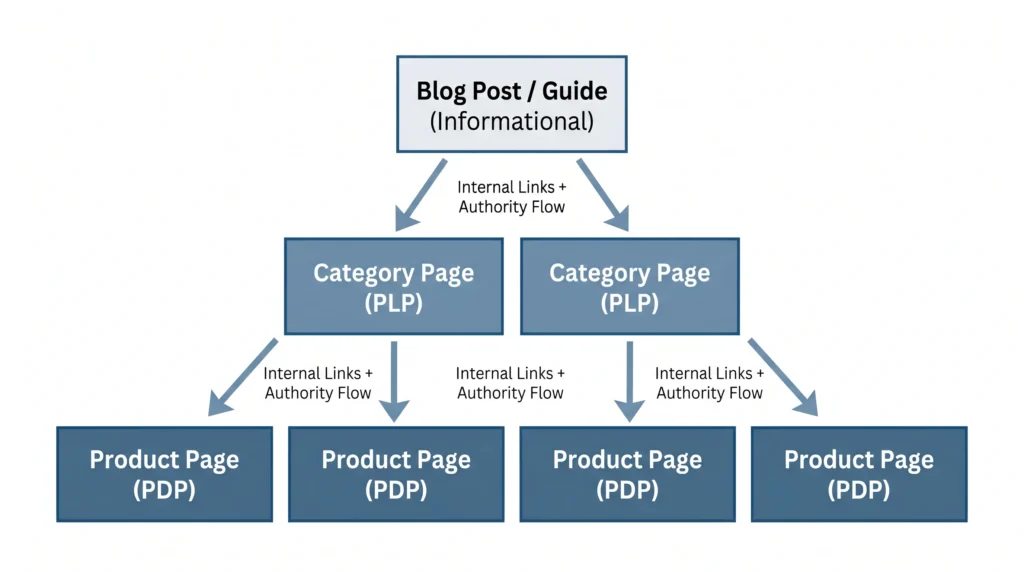
Look, if you’re running a mid-size Shopify store and wondering why your product pages won’t crack page one, here’s what actually works: build topical authority above your product pages with informational content, then internal-link into them.
A blog post ranking for “how to choose trail running shoes” that links to your category page passes authority and captures searchers at an earlier buying stage. This is the content silo model, and it works.
Once your product pages and content structure are optimized, the next step is building the broader digital system that compounds that traffic into sustained revenue growth. Our blueprint for scaling your business online with Garage2Global covers exactly that, including how e-commerce businesses specifically can reduce paid ad dependency and build organic revenue at scale.
Quick Comparison: Which Page Type Targets Which Intent
| Page Type | Best For | Target Keyword Type | Key Limitation |
| Product Page (PDP) | Transactional buyers | Brand + model, exact product terms | Can’t rank for informational queries |
| Category Page (PLP) | Commercial researchers | Broad category, filtered variations | Thin content kills rankings |
| Blog/Guide | Informational searchers | How-to, comparison, best-of | Doesn’t convert without internal links to product pages |
| Landing Page | Campaign-specific traffic | Branded + promo terms | Low organic longevity |
3-Column Summary Table: Key On-Page Elements by Priority
| On-Page Element | Why It Matters | Quick Action |
| Title Tag | First signal Google reads; controls SERP display | Keyword in first 4 words, under 58 chars |
| Product Description | Establishes topical relevance; avoids duplicate content penalty | Unique, use-case-led copy with semantic keyword variations |
| Product Schema | Enables rich results (stars, price, availability) in SERP | Implement via JSON-LD; verify in Google Rich Results Test |
| Canonical Tags | Prevents duplicate page variants from splitting ranking signals | Required on all filtered/variant URLs in Shopify & WooCommerce |
| FAQ Section | Feeds AI Overview sourcing; improves rich result eligibility | Add FAQPage schema; write answers in plain, direct language |
The On-Page Elements That Move Ecommerce Rankings
This is where execution happens. Here’s exactly what to optimize, in priority order.
Title Tags and Meta Descriptions
Your title tag is the single most important on-page signal Google reads first. For ecommerce pages, structure it like this:
- Product page: [Product Name] [Key Differentiator] | [Brand] Example: Nike Pegasus 41 Trail Waterproof, Wide Fit | RunHouse
- Category page: [Category Keyword] [Benefit or Filter] | [Brand] Example: Women’s Trail Running Shoes Waterproof & Wide Fit | RunHouse
Keep it under 58 characters. Not 60. Google truncates at roughly 580 pixels, not character count, and mobile titles display shorter.
Meta descriptions don’t directly affect rankings, but they affect CTR, which affects rankings indirectly. Write them for the human, not the algorithm:
Bad: “Shop our collection of women’s trail running shoes at RunHouse.” Good: “Waterproof, wide-fit trail shoes for women, free shipping over $75. Compare 34 styles and filter by terrain, drop, and width.”
The second version answers three questions the buyer is already thinking: Is this for me? Will I pay for shipping? Can I find what I need fast?
Product images are another on-page element most Shopify and WooCommerce stores get wrong by default. Camera-generated filenames like DSC_0047.jpg send Google no signal at all. For the full system filename, alt text, page copy, and image sitemap aligned, see our guide on how to name product images for SEO.
H1 Tags and Product Descriptions
One H1 per page. It should include your target keyword, but not be identical to your title tag.
For product descriptions, this is where most stores lose. Manufacturer copy is a duplicate content trap. Write descriptions that:
- Lead with the primary use case, not the product name
- Include semantic variations of your target keyword naturally (Surfer SEO’s Content Editor is useful here, as it shows which related terms top-ranking pages use)
- Answer the top 3 buyer objections: sizing, durability, and compatibility, because these are often the same questions in Google’s “People Also Ask” boxes
URL Structure
Clean, short, keyword-containing URLs outperform long auto-generated ones.
Bad: /collections/footwear/products/nike-pegasus-41-trail-running-shoe-womens-sz-8-blue-2024 Good: /products/nike-pegasus-41-trail-womens
For category pages: /collections/womens-trail-running-shoes
No session IDs. No parameters in canonical URLs. No duplicate pages for filtered views without proper canonicalization. This is one of the most common technical mistakes on ecommerce sites, and it directly suppresses rankings.
Schema Markup
Product schema is non-negotiable for ecommerce. It enables rich results, star ratings, price, and availability directly in the SERP, which increases CTR even when you’re not ranking #1.
At a minimum, implement:
- Product schema with name, description, image, sku, offers (price + availability), and aggregateRating
- BreadcrumbList schema on all pages
- FAQPage schema on any product or category page with a Q&A section
Shopify’s native schema is functional but incomplete. Most themes don’t include aggregateRating automatically; you’ll need to add it via a theme edit or an app like SEO King or JSON-LD for SEO.
The AI Overview Problem Ecommerce Stores Are Ignoring
Here’s what neither of the top-ranking competitors on this topic has addressed, and it’s arguably the most important shift in ecommerce SEO right now.
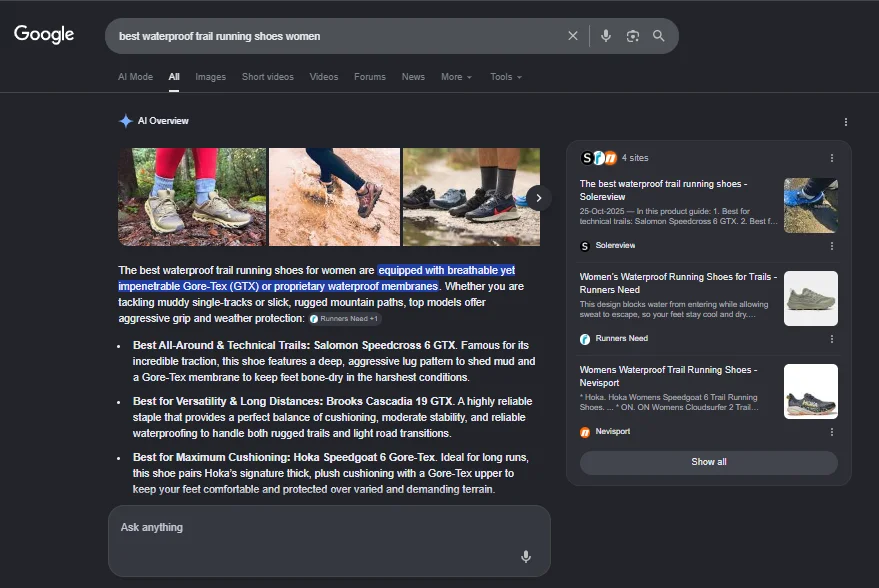
According to Seer Interactive’s September 2025 analysis, organic CTR dropped 61% for queries that trigger AI Overviews from 1.76% to 0.61%. That’s not a minor dip. For a category page getting 10,000 monthly impressions, that’s roughly 1,150 fewer clicks per month from a single algorithm feature.
The good news: when your brand is cited inside an AI Overview, you earn 35% more organic clicks and 91% more paid clicks compared to brands not cited at all (same source).
So the question isn’t how to avoid AI Overviews. It’s how to get cited in them.
For ecommerce pages, the signals that correlate with the AI Overview citation are:
- Structured, direct answers in product descriptions and category intros AI Overviews pull from content that answers questions cleanly, not marketing copy
- FAQ sections with schema, Google’s AI pulls heavily from FAQPage markup
- Review content with specifics, aggregate review summaries that mention use cases, not just star ratings
- E-E-A-T signals author credentials on blog content, brand mentions from credible sources, and consistent NAP data if you have physical locations
The practical implication: stop writing product descriptions that read like ad copy. Start writing them like you’re answering a specific buyer question. “Who is this shoe for? What terrain does it handle? What’s the sizing like?” answered concisely, in plain language, in the description itself.
That changes everything.
Mobile-First Optimization: The On-Page Element Nobody Audits Correctly
According to Statista data cited by multiple 2025 sources, 75% of ecommerce website traffic comes from mobile devices. Google indexes your mobile version first.
Most on-page audits don’t check mobile-specific issues. They check the desktop.
The on-page elements that behave differently on mobile and directly affect rankings:
- Title tag truncation in mobile SERPs truncates even shorter than desktop; your keyword should appear in the first 4 words
- Image alt text, mobile users on slow connections often see alt text before images load; alt text that describes the product and includes a natural keyword phrase serves both SEO and accessibility
- Above-the-fold content on mobile, if your product name, primary image, and Add to Cart button aren’t visible without scrolling, Google’s Core Web Vitals signals (specifically LCP) are likely hurting you
- Tap target sizing filter buttons on category pages that are too small to tap cleanly, increase bounce rate; bounce rate signals (via engagement metrics in GA4) are behavioral ranking inputs
I’ve seen conflicting data on exactly how much weight Google places on engagement signals like bounce rate vs. traditional on-page factors. Some SEO professionals argue they’re negligible, and there’s valid research on both sides. My read is that for ecommerce specifically, where Google can observe clear behavioral patterns (click, bounce back to SERP, click competitor, stay) at scale, engagement signals matter more than in other niches.
Run your top 10 product pages through Google’s PageSpeed Insights and Mobile-Friendly Test. Not your homepage. Your actual product pages frequently have heavier image loads and more JavaScript than the rest of the site.
Voice Search and AEO: 5 Questions Your Pages Should Already Answer
Q: What’s the best way to optimize a product page for SEO? A: Target one specific transactional keyword in the title tag, H1, and URL. Write a unique description that answers the top three buyer questions. Add Product schema with price and review data.
Q: How do I optimize a category page for Google? A: Add a keyword-rich H1, a 100–200 word intro above the product grid, and contextual copy below it. Avoid thin pages with only product thumbnails — Google needs text to understand page relevance.
Q: Should I use the same keyword on my product page and category page? A: No. That’s keyword cannibalization. Your category page targets the broad term; product pages target specific model or variant terms. Separate them deliberately or Google will choose which one ranks — and it’s rarely the one you want.
Q: Why does my ecommerce page rank but get no clicks? A: Your title tag or meta description probably isn’t compelling enough, or an AI Overview is absorbing clicks above your result. Rewrite your meta description to answer a specific buyer question and test the impact on CTR in Google Search Console.
Q: When should I add FAQ content to a product page? A: Any time the product has common objections, sizing questions, compatibility concerns, or use-case variations. FAQ sections with FAQPage schema improve rich result eligibility and directly feed Google’s AI Overview sourcing.
Where to Start: A Prioritized Action Plan
You don’t have to do all of this at once. Here’s the sequence that produces results fastest:
- Run a GSC query audit, find your top 20 pages by impressions, check which queries they appear for, and confirm you have one clear target keyword per page
- Fix keyword cannibalization if two pages target the same keyword, canonicalize the weaker one, or consolidate content
- Rewrite title tags and meta descriptions for your top 10 revenue pages, lead with the keyword, add a specific benefit, and keep under 58 characters
- Add or rewrite product descriptions with unique, use-case-led copy that includes semantic keyword variations naturally
- Implement Product schema on all PDPs, verify with Google’s Rich Results Test
- Add FAQ sections to your 5 highest-traffic product and category pages, write them for AI Overview citation, not just for readers
- Audit category pages for thin content, add intro copy above the grid, and contextual copy below
- Run mobile PageSpeed tests on top product pages. Anything scoring below 50 on mobile needs image optimization and script deferral
Some SEO professionals argue you should start with technical SEO before on-page. That’s valid for sites with serious crawl or indexation issues. But if your pages are indexed and you’re just not ranking, on-page is almost always the faster path to visibility.
If you’d rather hand the execution to specialists, our complete SEO optimization service covers every step in this framework from audit to implementation.”
The One Mistake That Undoes All of It
You’ve done everything right. Keyword research, unique descriptions, schema, internal links. And six months later, still nothing.
Check for this: duplicate page variants without canonical tags.
Shopify and WooCommerce both generate multiple URL versions of the same product page, filtered views, session parameters, color/size variants, and if canonical tags aren’t set correctly, Google splits your ranking signals across four versions of the same page instead of consolidating them to one.
According to the Charle Agency’s 2026 ecommerce SEO statistics report, 53% of ecommerce sites have missing canonical tags, affecting an average of 40% of pages on affected sites.
Fix your canonicals before anything else gives you diminishing returns.
If you want to understand how crawl budget and indexation issues compound on-page problems, our technical SEO audit guide walks through the full diagnostic process.
This guide works best for Shopify and WooCommerce stores with at least 20 product pages that are indexed but underranking. It won’t solve problems caused by manual Google penalties, severe domain authority gaps, or technical crawl blocks that require separate audits.


Leave a Reply