
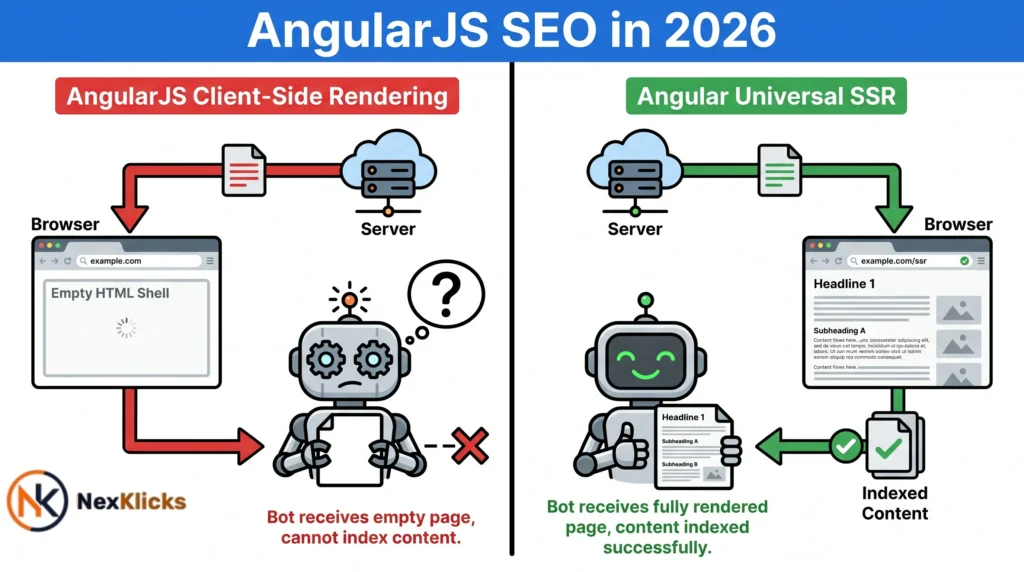
AngularJS SEO is one of the most misunderstood technical challenges in web development. Developers love AngularJS for its speed and modularity. Search engines don’t. Angular single-page applications serve content entirely via client-side rendering, so crawlers often land on an empty HTML shell with nothing to index.
If your Angular site has good content but zero organic traffic, that’s almost certainly a rendering problem. This guide shows you exactly how to diagnose it, fix it, and keep it fixed in 2026.
AngularJS SEO refers to optimizing AngularJS and Angular single-page applications so that Googlebot and other crawlers can successfully crawl, render, and index content. Because Angular builds its DOM inside the browser rather than on the server, crawlers often receive an empty page unless specific rendering solutions are in place.
What Is AngularJS and Why Does It Create SEO Problems?
AngularJS vs. Modern Angular: What’s the Difference?
AngularJS is Google’s original JavaScript framework, version 1.x, now fully end-of-life. Modern Angular (v2+) is a TypeScript-based rewrite with native server-side rendering support through Angular Universal. Most AngularJS framework SEO problems come from sites still on v1, or Angular v2+ apps with no SSR configured. According to HTTP Archive’s Web Almanac 2023, over 17% of mobile pages use client-side rendering frameworks, yet this introduces an indexing delay of minutes to several days. Search engines receiving an empty HTML shell cannot rank content they never see.
Why AngularJS Is a High-Risk Choice for SEO in 2026
AngularJS SEO reached end-of-life in December 2021. No security patches, no performance updates. Sites still running it carry AngularJS indexing issues, Core Web Vitals penalties, and AI search blindspots. Every fix works against an unsupported architecture. The risks stack.
How Search Engines Crawl and Index JavaScript-Heavy Sites
Google’s Two-Wave Indexing Process: What It Means for Angular SPAs
Two-wave indexing is why angular spa indexing fails quietly. Wave 1 is immediate: Googlebot fetches raw HTML and finds a shell with one div and JavaScript bundle links. Wave 2 renders the JavaScript, sometimes days later. On large or frequently updated sites, that gap creates real ranking losses. Google’s crawl timeout is four seconds. If your Angular app hasn’t rendered critical content by then, Google moves on.
Why Bing, Baidu, and Yandex Struggle Far More Than Google
Googlebot JavaScript rendering is the most advanced in the industry, and it’s still imperfect. Bing, Baidu, and Yandex have limited or no ability to render JavaScript SPAs at all. Bing drives 5 to 15% of US search traffic depending on the industry. Pre-rendering SEO and SSR solve this by delivering fully rendered HTML to every crawler.
Quick Comparison
| Option | Best For | Key Benefit | Limitation |
|---|---|---|---|
| Client-Side Rendering | Developer experience | Fast interaction after load | Invisible to most crawlers |
| Server-Side Rendering | Full SEO coverage | Crawlers get complete HTML instantly | Adds server infrastructure cost |
| Static Site Generation | Content pages, blogs | Pre-built HTML, zero render delay | Not suited for real-time dynamic content |
| Pre-rendering Middleware | Fast stopgap fix | No rebuild required | Adds an infrastructure layer |
Challenges of AngularJS SEO
The Client-Side Rendering “Empty Shell” Problem
When Googlebot visits an unoptimized Angular page, your server returns one div and JavaScript bundle links. No headings, no copy, no internal links. Spa crawlability requires the crawler to execute JavaScript and wait for the DOM to populate. Googlebot does this imperfectly. Every other major crawler cannot do it at all.
Hash-Based URLs, Missing Metadata, and Crawlability Gaps
Default Angular routing SEO creates hash fragments like site.com/#/about. Search engines don’t index fragments, so every page appears to be the same URL. Angular metadata compounds the problem: without per-route configuration, every page shares the same hardcoded title from index.html, signaling a low-quality site-wide.
Internal links built via JavaScript event handlers may not pass PageRank. If your product runs on a SaaS stack alongside Angular, the same rendering gaps apply across your entire tech layer. See how AngularJS SEO principles extend to SaaS applications in our dedicated guide.
Page Load Speed and Core Web Vitals Impact
Angular core web vitals suffer from heavy JavaScript bundles inflating Largest Contentful Paint and Total Blocking Time, both direct ranking signals. If your app loads a 2MB bundle and fetches API data before rendering anything, it will exceed Google’s four-second crawl timeout. Those pages won’t just rank poorly. They won’t get indexed.
How to Audit Your AngularJS Site for Indexing Issues First
Most guides skip straight to fixes. Don’t. Confirm what Google actually sees before changing anything.
Using Google Search Console to Identify Rendering Failures
Run the URL Inspection tool on a key page and click “Test Live URL.” If the rendered HTML shows an empty shell or a loading spinner, you have a confirmed gap. In the Coverage report, filter for “Crawled, currently not indexed.” These statuses mean Google found your URLs but couldn’t extract enough content to index them.
To audit your Angular site for indexing issues, follow these steps:
- Run the URL Inspection tool on a key page in Google Search Console.
- Compare the crawled HTML with your live page’s rendered content.
- Check the Coverage report for “Crawled, currently not indexed” errors.
- Run Screaming Frog in JavaScript rendering mode and compare source vs. rendered output.
- Right-click any Angular page and select Inspect Element before interacting with anything.
Simulating Googlebot With Screaming Frog and the Inspect Element Test
Screaming Frog SEO Spider is the most reliable tool for diagnosing JavaScript SEO rendering gaps at scale. Set rendering to “Googlebot” under Configuration > Spider > Rendering, set the wait time to four seconds, then compare “HTML” against “Rendered HTML” for each page. A large difference confirms a rendering gap. Screaming Frog’s official documentation confirms its mode accurately replicates Googlebot’s execution environment.
For a faster manual check, open your Angular site in Chrome, right-click before interacting with anything, and select Inspect. What the Elements panel shows at that moment is approximately what Googlebot sees. If your <h1>, body copy or key CTAs are missing, they are invisible to every search engine.
Best Practices for AngularJS SEO
Implement Server-Side Rendering (SSR) With Angular Universal
Angular Universal SEO is the most effective long-term fix. SSR renders complete HTML for each route on the server before delivery, so crawlers get a fully populated document on the first request. Server-side rendering SEO improves LCP scores and enables per-route metadata injection, solving the identical-title problem site-wide. Run ng add @angular/ssr from the Angular CLI. For most projects, this is a multi-day effort, and the right long-term investment for AngularJS SEO optimization.
SSR vs. SSG: SSR is better for dynamic or personalized content because it renders on each request. SSG works better when content is stable and pre-built at compile time. SSR handles real-time data. SSG delivers faster loads with zero server computation at request time.
Use Static Site Generation (SSG) for High-Priority Pages
Static site generation pre-builds HTML at compile time and serves it from a CDN. For blogs, landing pages, and product pages, SSG eliminates indexing delay entirely, with no rendering queue, no JavaScript wait time, and no crawl timeout risk. It’s also the most AI-crawler-compatible rendering approach available.
Fix URL Structure and Add Per-Route Metadata
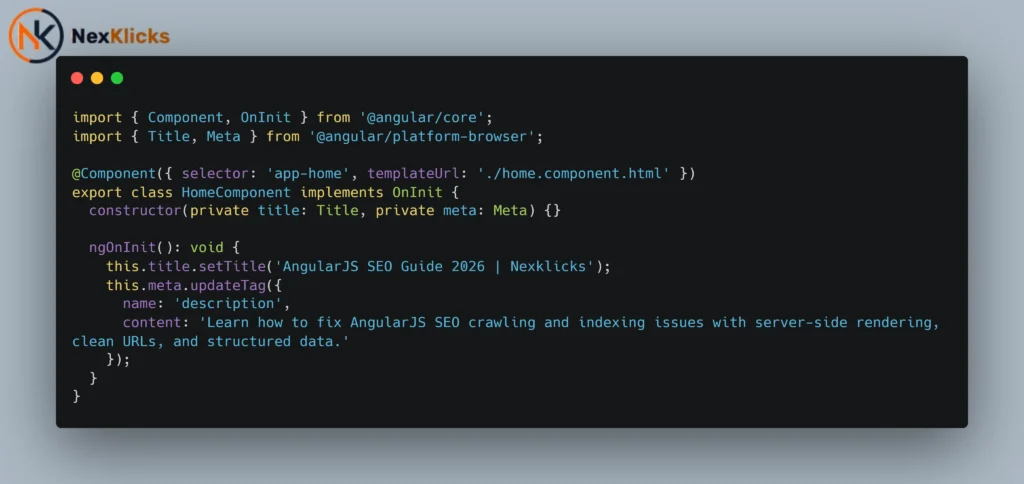
For AngularJS v1, configure $locationProvider with html5Mode(true) to replace hash URLs with clean pushState routing. For modern Angular, check your router config for useHash: true and remove it. Submit clean canonical URLs in your XML sitemap to both Google Search Console and Bing Webmaster Tools. Use Angular’s Title and Meta services to inject unique titles, descriptions, and Angular canonical tags per route. Add structured data via schema.org in the initial server response, not post-load. Schema markup added by JavaScript after page load may not be parsed by all crawlers.
Canonical tags on all indexable pages to prevent duplicate content issues. Mobile performance is equally important since Google indexes mobile-first. Run through our mobile SEO checklist after implementing your metadata fixes to make sure nothing is missed on smaller screens.
Angular’s official SSR documentation confirms native server-side rendering is built into the Angular CLI as of Angular 17.
AngularJS SEO for AI Search Engines (AEO Readiness)
Why AI Bots Cannot Render Angular SPAs
AI search engines like ChatGPT, Perplexity, and Google’s AI Overview are text retrieval systems. They don’t execute JavaScript. When these bots crawl a client-side Angular page, they hit the same empty shell as legacy crawlers. This creates a retrieval gap: your content won’t appear in AI-generated answers regardless of how authoritative it is.
You’re invisible in the fastest-growing distribution channel in search. Rendering gaps are one piece of the problem. Read our breakdown of common AI SEO mistakes to see the full list of errors that keep brands out of AI-generated answers.
How to Deliver Clean HTML for AI Crawler Compatibility
Server-side rendering and static site generation both solve AI visibility at the architectural level. If you’re not ready for a full rebuild, Prerender.io intercepts bot requests by user agent and serves pre-rendered HTML snapshot versions without touching your Angular codebase. Keep all structured data in the initial HTML response. AI systems read the initial document only, so post-load-injected schema won’t be captured.
AEO Readiness Checklist
- Fully rendered HTML on first server response, confirmed in Google Search Console.
- Unique per-page title tags and meta descriptions are injected server-side.
- Schema markup in raw HTML source, not post-load.
- No critical content behind click interactions or accordions.
- Clean pushState URLs, no hash fragments, XML sitemap current in both Search Console and Bing Webmaster Tools.
- Angular canonical tags are set on all indexable routes.
- Screaming Frog audit confirming rendered output matches live page.
Should You Migrate Away from AngularJS in 2026?
AngularJS v1 has no path forward. Every SEO fix is a workaround. You can’t use Angular Universal native SSR or apply modern AngularJS SEO best practices without constantly fighting the architecture. No security patches since December 2021 means the technical debt is compounding on two fronts at once.
If migration is six or more months away, deploy Prerender.io as a bridge. It resolves the worst dynamic content indexing failures fast, covers non-Google crawlers and AI bots, and requires no rebuild. When you’re ready, Modern Angular with native SSR is the most direct upgrade path. Next.js and Nuxt.js are strong alternatives with mature SEO for JavaScript framework ecosystems. Migration is the only permanent fix. Once you’ve switched, avoid repeating the same configuration errors. Our guide to SaaS SEO mistakes to avoid covers what trips up most teams after a framework switch.
Frequently Asked Questions About AngularJS SEO
Q: What’s the best way to fix AngularJS SEO without rebuilding the entire site?
A: Use a pre-rendering middleware service like Prerender.io. It serves static HTML snapshots to bots without requiring changes to your Angular codebase.
Q: How do I know if Google is actually indexing my Angular pages?
A: Run the URL Inspection tool in Google Search Console. If the rendered HTML differs significantly from your live page, your content is not being indexed correctly.
Q: Should I use SSR or SSG for my Angular app?
A: Use SSR for real-time or user-specific content. Use SSG for stable pages like blogs and landing pages. Most large apps benefit from both approaches.
Q: Why does my Angular site rank on Google but not on Bing?
A: Google’s two-wave indexing eventually processes client-side rendered content. Bing cannot render JavaScript at all. SSR or pre-rendering fixes visibility across all search engines.
Q: When should I migrate away from AngularJS v1?
A: The case is already overdue. Apply Prerender.io immediately, then migrate to modern Angular, Next.js, or Nuxt.js within your next development cycle.
Conclusion
AngularJS SEO problems are solvable. They’re consistently caused by the same rendering decisions and fixable with a clear technical strategy. Client-side rendering is a liability in 2026, not just for traditional search but for AI search engines reshaping how content gets discovered and cited.
The one mistake to avoid: applying surface-level fixes like adding metadata to index.html and submitting sitemaps, without ever confirming what the crawler actually receives. Audit first. Confirm the gap. Fix it at the rendering layer.
Your next action: open Google Search Console, run the URL Inspection tool on your five most important Angular pages, and compare rendered HTML against live content. If they don’t match, you have your diagnosis. Nexklicks specializes in exactly this kind of angularjs seo audit and fix process. If you need a partner to restore your Angular site’s visibility from the ground up, that’s where we start.
Learn how to fix AngularJS SEO crawling, indexing, and rendering issues that are silently killing your search rankings. This guide covers auditing, server-side rendering, AI search readiness, and step-by-step technical fixes for Angular single-page applications.
Last update: June 2026


Leave a Reply