
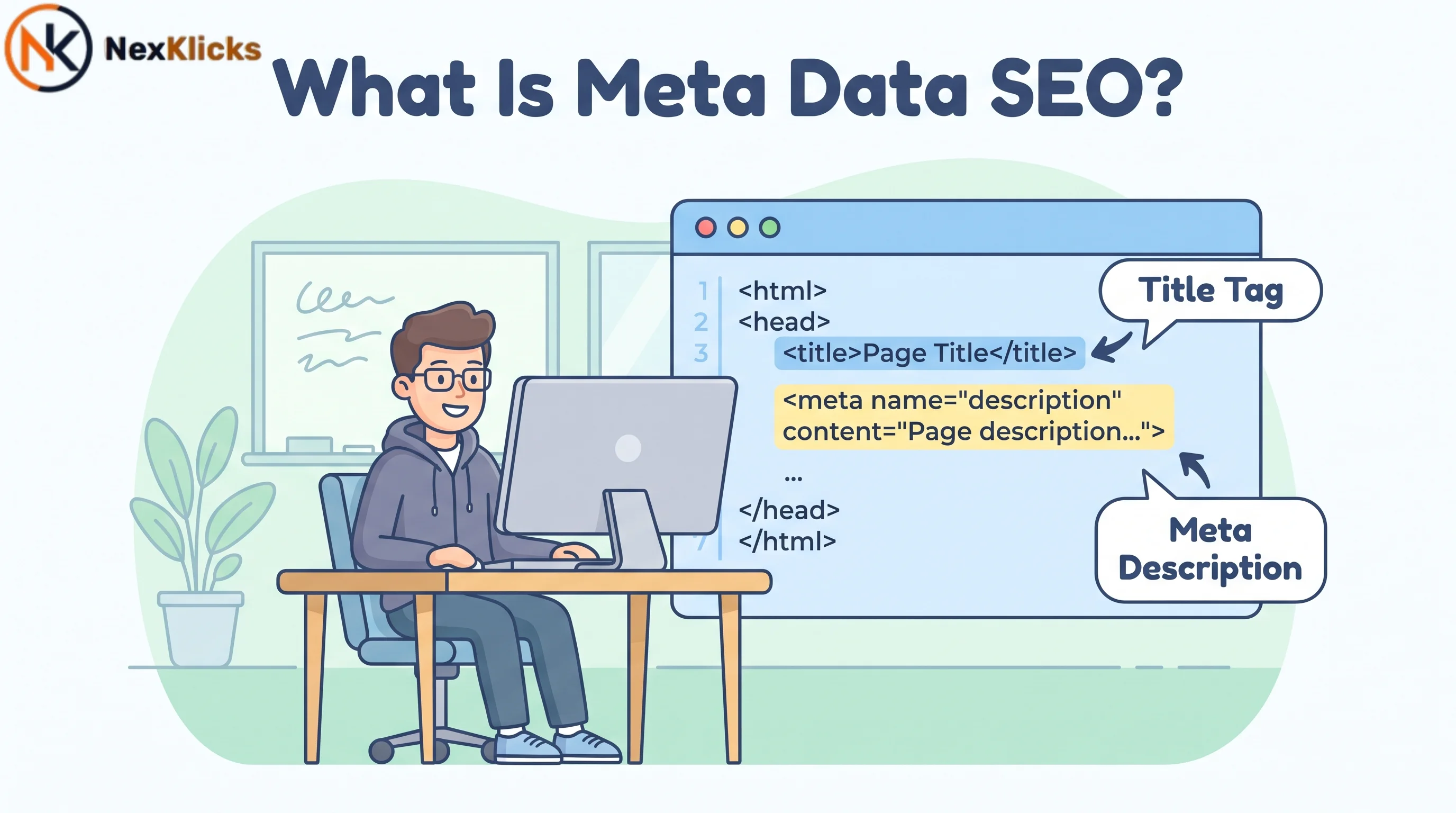
If you have ever wondered what is meta data SEO and why it matters for your website, you are not alone. The term gets thrown around constantly, but few people explain what it actually means. In simple terms, metadata is information that describes other data. For websites, it refers to the HTML tags in your page’s <head> Section that summarizes your content for search engines and visitors.
These tags influence how your pages appear in search engine results pages and whether people click through. Without proper indexing signals, even great content can get overlooked. Understanding what is meta data SEO is your first step toward better on-page SEO and higher organic visibility.
What Is Metadata in SEO?
Definition of Metadata for SEO
What is meta data SEO refers to the practice of using HTML meta tags to provide information about a web page to search engines and website visitors. These tags live in the
<head>section of your HTML code and are not visible on the page itself. They work behind the scenes to help search engines understand your content.
When a search engine crawls your site, it reads these tags to determine what your page is about. This helps Google decide whether your content is relevant to a user’s search query. The two most important pieces of metadata for SEO are the page title and the meta description, but there are several other tags that play crucial roles as well.
Page Titles vs. Meta Descriptions: The Two Core Components
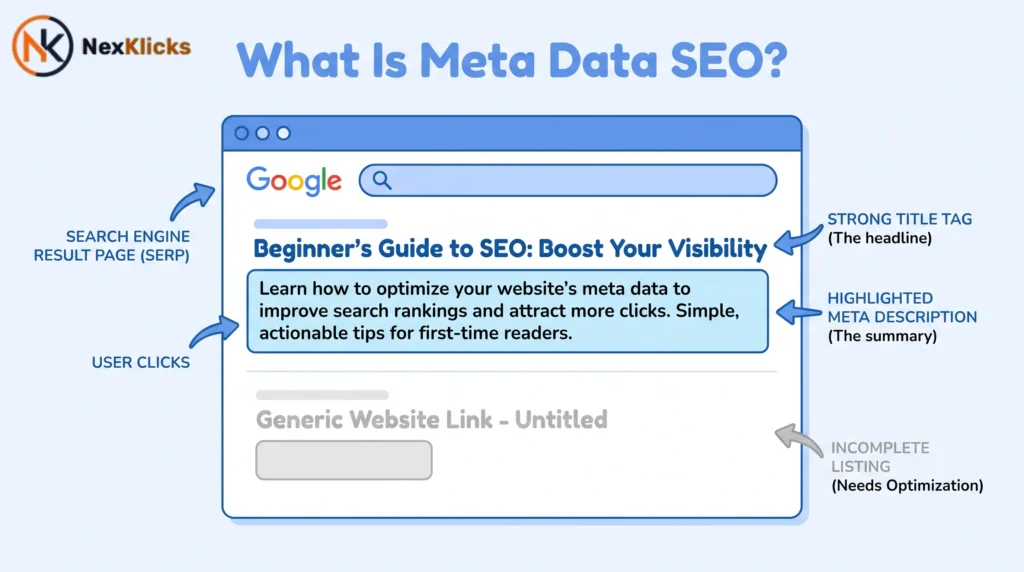
The page title, often called the title tag, is the clickable headline you see in search results. It is arguably the most important on-page SEO element because it tells search engines exactly what your page covers. Your title tag also appears in the browser tab and when someone shares your page on social media.
The meta description, on the other hand, is the short blurb of text that appears below the title in search results. While it does not directly impact rankings, it plays a huge role in whether someone actually clicks through to your site. Think of the meta description as your ad copy. It is your chance to convince searchers that your page has the answer they are looking for.
Together, these two components form the foundation of metadata SEO. When optimized correctly, they can significantly improve your visibility in organic search results and drive more qualified traffic to your website.
Why Is Metadata Important for SEO?
Does Metadata Help with Search Rankings?
This is one of the most common questions people ask when they start learning what is meta data SEO, and the short answer is: it depends on which tag you are talking about.
Title tags are absolutely a Google ranking factor. Google uses them to understand the topic of your page and determine its relevance to search queries. A well-crafted title tag with your target keyword near the beginning can help boost your position in search results.
Meta descriptions, however, are not a direct ranking factor. Google has confirmed this multiple times. But before you dismiss them as unimportant, consider this: a compelling meta description can significantly improve your click-through rate, which sends positive signals to Google about your content’s relevance.
The Direct Impact on Click-Through Rate (CTR)
Here is where metadata really shines. According to a 2018 study by Backlinko analyzing 5 million Google search results, pages with a meta description that matched the search query had a notably higher click-through rate than those without.
That might not sound like much, but think about it in terms of traffic. If your page gets 1,000 impressions per month, even a modest increase in CTR means dozens of extra visitors. Scale that across all your pages, and the numbers add up quickly. A well-optimized meta description essentially acts as free advertising.
Meta Data and User Experience (UX)
Beyond rankings and clicks, metadata also plays a role in user experience. The meta viewport tag, for example, tells mobile browsers how to display your page. Without it, your site might look broken on smartphones, leading to high bounce rates and frustrated visitors.
Clear metadata also sets accurate expectations. When your title and description match what the user actually finds on your page, they are more likely to stay and engage with your content. This reduces bounce rates and improves user engagement, both of which are signals that Google considers when evaluating your site’s quality.
The Most Important Meta Tags for SEO
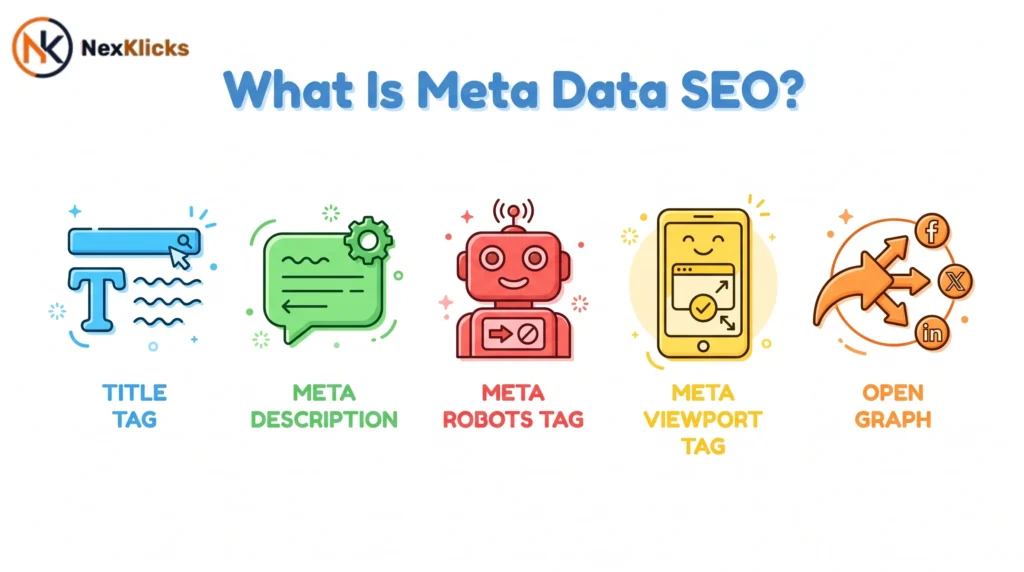
Title Tag: Your Clickable Headline
The title tag is the single most important meta tag for SEO. It appears as the clickable headline in search results and is used by Google to determine your page’s topic. In Q1 2025, Google rewrote 76% of title tags to better match search queries, according to industry data. This means that even if you write a perfect title, Google might change it.
Despite that, you should still optimize your title tags. Here is why: when Google does use your version, you want it to be compelling and keyword-rich. A good title tag includes your primary keyword near the beginning, stays within 50-60 characters, and accurately reflects the page content.
Meta Description: The Ad Copy for Your Page
Your meta description is your chance to sell the click. While it does not directly affect rankings, it can dramatically impact your CTR. A well-written meta description summarizes the page content, includes relevant keywords, and includes a call to action.
For best results, keep your meta description between 150-160 characters. Google often rewrites meta descriptions as well, pulling text from the page that better matches the search query. But when your description does appear, you want it to be persuasive and informative.
Title Tag vs Meta Description: Title tags are a direct Google ranking factor, while meta descriptions are not. Titles tell search engines what your page is about. Descriptions tell users why they should click. The key difference is ranking power versus click-through power. Both are essential for SEO success.
Meta Robots Tag: Controlling Search Engine Crawling
The meta robots tag tells search engines how to crawl and index your pages. This is one of the most powerful and underutilized meta tags. It can prevent duplicate content issues, keep thin pages out of the index, and protect your site’s crawl budget.
Common values include:
- noindex: Prevents the page from appearing in search results
- nofollow: Tells search engines not to follow links on the page
- noarchive: Stops Google from showing a cached version
- nosnippet: Prevents a snippet from being shown
Usage of the meta robots tag has crept up to 46.2% in 2025 as more site owners realize its importance for controlling what gets indexed.
Meta Viewport Tag: Ensuring Mobile-Friendliness
The meta viewport tag is essential for mobile SEO. It tells browsers how to scale your page on different devices. Without it, your content might appear zoomed out or too small to read on a phone.
Here is what the viewport tag typically looks like:
<meta name="viewport" content="width=device-width, initial-scale=1.0">
This simple line of code ensures your site is mobile-friendly, which is a key ranking factor in Google’s mobile-first indexing approach. If you want to go deeper, this mobile SEO checklist covers every technical element you need to verify before launch.
Open Graph and Twitter Cards: Enhancing Social Sharing
When someone shares your page on social media, the title, description, and image are pulled from your Open Graph tags. These tags control how your content appears on platforms like Facebook, LinkedIn, and X.
Open Graph tags include:
- og:title: The title for social sharing
- og:description: The description for social sharing
- og:image: The image that appears in the social post
While these tags do not affect Google rankings directly, they can improve your social media visibility and drive referral traffic. Given that social signals can indirectly influence SEO, they are worth implementing.
Schema Markup: The Language of AI and Search Engines
Schema markup is structured data that helps search engines and AI systems understand your content in a more nuanced way. It goes beyond traditional metadata by providing explicit context about what your page contains.
For example, schema can tell Google that a page is a recipe, a product, an event, or a local business. This information can be used to generate rich results, including star ratings, pricing, and availability. According to recent data, 97% of top results now use schema markup. If you are not using it, you are falling behind.
How to Optimize Your HTML Meta Tags for SEO
How to Write the Perfect Title Tag (Meta Title)
Crafting the perfect title tag takes practice, but these guidelines will help you get it right:
- Keep it between 50-60 characters. Any longer, and Google will truncate it in search results.
- Put your primary keyword first. This signals relevance to search engines and helps with ranking.
- Match search intent. If users are looking for information, your title should reflect that.
- Make it compelling. A boring title gets fewer clicks. Use power words and emotional triggers where appropriate.
- Avoid clickbait. Your title should accurately reflect the page content to reduce bounce rates.
Here is an example of a well-optimized title tag:
What Is Meta Data SEO? Complete Guide for 2026 | Nexklicks
This title puts the primary keyword first, is under 60 characters, and includes a year to signal freshness.
How to Write a Compelling Meta Description
Your meta description should be a concise summary of the page that entices users to click.
Here is how to write one that converts:
- Stay within 150-160 characters. Anything longer gets cut off.
- Include your target keyword naturally. Google bolds keywords that match the search query, making your listing stand out.
- Add a call to action. Phrases like “Learn more,” “Get started,” or “Find out how” encourage clicks.
- Write for humans, not robots. Your description should read naturally and make the user want to visit your page.
- Be specific. Vague descriptions do not help anyone. Tell the user exactly what they will find.
How to Implement Meta Tags on Your Website
Using Yoast SEO or Similar Plugins (WordPress)
If you use WordPress, the easiest way to add metadata is through an SEO plugin. Yoast SEO is one of the most popular options. Once installed, you can edit your title tags and meta descriptions directly from the WordPress editor.
Here is how to do it:
- Install and activate Yoast SEO from the WordPress plugin repository.
- Edit the page or post you want to optimize.
- Scroll down to the Yoast SEO meta box.
- Enter your desired title tag in the “SEO title” field.
- Enter your meta description in the “Meta description” field.
- Save your changes.
Adding HTML Code Manually to Your <head> Section
If you are comfortable with code or do not use a CMS, you can add meta tags directly to your HTML. The tags go inside the <head> section of your page:
<!DOCTYPE html>
<html>
<head>
    <title>What Is Meta Data SEO? Complete Guide for 2026</title>
    <meta name="description" content="Learn what is meta data SEO and how to optimize title tags, meta descriptions, and robots tags for better rankings and CTR.">
    <meta name="robots" content="index, follow">
    <meta name="viewport" content="width=device-width, initial-scale=1.0">
</head>
<body>
    <!-- Your content here -->
</body>
</html>
This approach gives you complete control but requires careful attention to syntax.
How to Check for Meta Tag Issues with Semrush
Semrush Site Audit is an excellent tool for identifying meta tag problems across your entire site. Here is how to use it:
- Enter your domain in Semrush and click “Start Audit.”
- Configure the settings and run the audit.
- Once complete, go to the “Issues” tab.
- Search for “meta description” to find missing or duplicate descriptions.
- Search for “title” to find missing, duplicate, or overly long title tags.
The tool will provide a list of URLs that need attention, making it easy to prioritize your fixes.
Common Meta Data SEO Mistakes to Avoid in 2026
Duplicate Titles and Descriptions
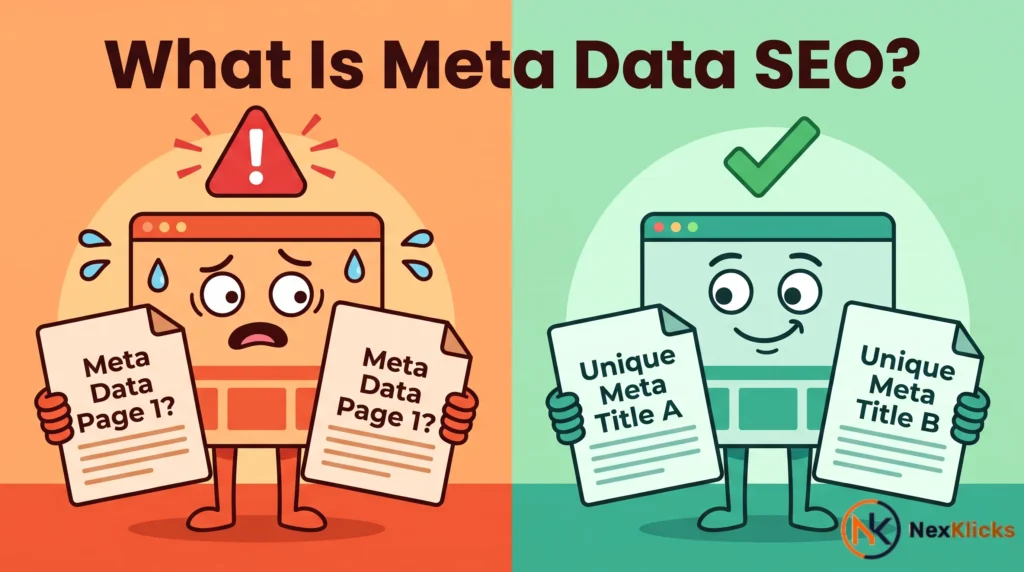
Using the same title tag or meta description across multiple pages is a common mistake that confuses search engines. When Google sees duplicate metadata, it struggles to determine which page is more relevant for a given query. This can lead to lower rankings for all the affected pages.
Each page on your site should have a unique title and description that reflect its specific content. Running a full technical SEO audit is the fastest way to surface duplicate metadata issues across your entire site at once.
If you run an online store, this gets complicated quickly. See how on-page SEO for ecommerce handles product and category page metadata at scale.
Keyword Stuffing
Keyword stuffing happens when you cram too many keywords into your metadata in an attempt to rank higher. This practice is not only ineffective but can also hurt your rankings. Google’s algorithms are sophisticated enough to detect unnatural keyword usage.
Write your metadata for people first. Include keywords where they make sense, but prioritize readability and user experience.
Overly Long or Short Tags
Title tags that are too long get truncated in search results, potentially cutting off important information. Titles that are too short miss an opportunity to include relevant keywords and context.
Similarly, meta descriptions that are too long get cut off, while ones that are too short may not provide enough information to entice clicks. Stick to the recommended character limits for best results.
Misusing the Meta Robots Tag
The meta robots tag is powerful, but it can also be dangerous if misused. Accidentally adding noindex to important pages will remove them from search results, killing your organic traffic. Adding nofollow to internal links can disrupt the flow of link equity through your site.
Always double-check your robots tags before publishing. Use noindex only on pages that should not appear in search results, such as thank-you pages, admin pages, or duplicate content.
How AI and Answer Engines Are Changing Metadata SEO
The Rise of AEO and GEO
Search is evolving. Traditional SEO is being supplemented by Answer Engine Optimization (AEO) and Generative Engine Optimization (GEO). These new disciplines focus on helping AI systems and generative engines understand and cite your content.
AEO is about optimizing your content to directly answer user questions, often through featured snippets and voice search. GEO is about structuring your content so that AI systems like ChatGPT can accurately summarize and reference it. Metadata plays a crucial role in both.
Writing Metadata for AI Summaries
When AI systems summarize your content, they often rely on your title and meta description to understand the topic. This means your metadata needs to be clear, descriptive, and packed with relevant entities.
Consider this: a generative AI tool might use your meta description as the source for a summary snippet. If your description is vague or keyword-stuffed, the AI might misrepresent your content.
To prepare for this shift, write your metadata with both humans and AI in mind. Use natural language, include relevant entities, and make sure your tags accurately reflect the page content.
What Is SEO Meta Data FAQ
Q: What is the difference between metadata and meta tags?
A: Metadata is a general term that refers to data about data. Meta tags are specific HTML elements that make up a page’s metadata. In other words, all meta tags are metadata, but not all metadata is a meta tag.
Q: Are meta keywords still used for SEO in 2026?
A: No. Google stopped using the meta keywords tag years ago because of abuse by spammers. Major search engines ignore it completely. Focusing on this tag is a waste of time.
Q: How long should a meta description be?
A: Aim for 150 to 160 characters. Google may truncate longer descriptions. Keep it concise and informative to maximize its impact.
Q: Why is Google not showing my meta description?
A: Google often rewrites meta descriptions to better match search queries. This is normal. You can improve the chances of your description appearing by making it highly relevant and informative. But ultimately, Google decides what to show.
Q: How often should I update my metadata?
A: Review your metadata every few months or whenever you make significant changes to your content. Regular updates keep your tags fresh and aligned with your current content strategy.
Optimize Your Meta Tags for SEO and User Experience
Final Checklist for Metadata Optimization
Before publishing any page, run through this checklist:
- [ ] Title tag includes primary keyword near the start
- [ ] Title tag is 50-60 characters
- [ ] Meta description is 150-160 characters
- [ ] Meta description includes a call to action
- [ ] Each page has a unique title and description
- [ ] Robots tags are correctly configured
- [ ] Viewport tag is present for mobile-friendliness
- [ ] Schema markup is added where appropriate
- [ ] Open Graph tags are set for social sharing
Next Steps for Your Metadata Strategy
Now that you understand what is meta data SEO, it is time to take action. Start by auditing your existing site. Use tools like Semrush or Google Search Console to identify missing or duplicate meta tags. Then, systematically work through the issues, optimizing each page one by one.
Remember, metadata is not a one-and-done task. It requires ongoing attention. As your content evolves, so should your metadata. Keep it fresh, keep it relevant, and keep it user-focused.
One more thing: avoid the common mistake of writing metadata for search engines instead of people. Yes, keywords matter. But ultimately, you are trying to persuade a human to click. Write like a human, and you will get human results.
Start today. Pick one page, optimize its metadata using the guidelines in this article, and track the results. You might be surprised by how much of a difference a few small changes can make.
This guide breaks down what is meta data SEO from scratch, covering title tags, meta descriptions, robots tags, and schema markup with clear examples and actionable optimization steps. Whether you are auditing an existing site or building from scratch, use this as your go-to reference for getting your metadata right in 2026.
Last Updated: June 2026

Leave a Reply